
Last Updated: November 2, 2026
Quick Summary
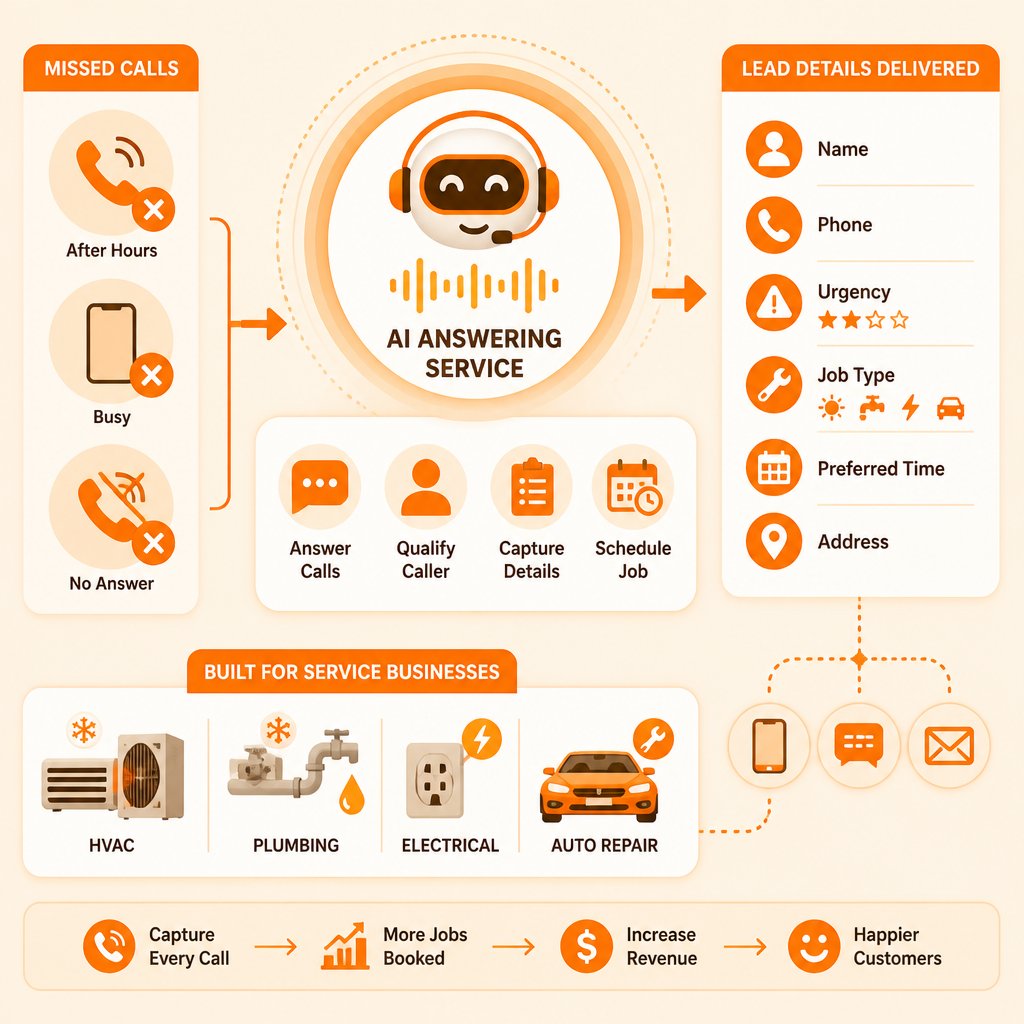
An AI answering service is software that answers phone calls your team can't pick up, talks with the caller in plain language, collects the details you need, and sends you a summary. It captures a lead rather than booking the job, quoting a price, or closing the sale.
- You keep your existing business number; unanswered calls forward to the AI answering service on your end.
- Ask urgency before details in your script, because an emergency caller won't sit through five questions.
- Have the AI read back the callback number and service address to prevent costly transcription errors.
- Capturing a lead is not the same as winning it, so you still have to call back fast.
- Compare the subscription against the coverage you would otherwise buy, not against zero.
Table of Contents
- What an AI Answering Service Does for a Small Business
- How AI Answering Services Work
- AI Answering Service Examples for HVAC, Plumbing, Electrical, and Auto Repair
- AI Answering Service Scripts That Collect the Right Job Details
- AI Answering Service vs. Virtual Receptionist: Which Fits Your Shop
- After-Hours Coverage and Missed-Call Lead Capture
- Integrations, Call Routing, and Handoff to a Human
- Privacy, Reliability, and What Happens When the AI Gets It Wrong
- How to Calculate Whether an AI Answering Service Pays for Itself
- Start Your CallGrabbr Trial and Test It on Your Own Phone
- Frequently Asked Questions
What an AI Answering Service Does for a Small Business
An AI answering service is software that answers phone calls your team can't pick up, talks with the caller in plain language, collects the details you need, and sends you a summary. For a small service business, it fills the gap between "nobody answered" and "the job is booked." The core problem is a specific moment: you're under a sink or on a roof, your phone rings, and you can't reach it.
That moment costs money. Many contractors suspect it. What's harder to see is how many callers simply hang up and dial the next shop rather than leave a voicemail.
Here's the distinction that matters most, and most guides blur it: an AI answering service captures a lead. It does not book the job, quote the price, or close the sale. It takes the name, the address, what's broken, and how urgent it is, then hands that to you so you can call back prepared. Keep that boundary in mind and you'll evaluate these tools far more clearly.
Below, we'll walk through how the calls actually flow, what scripts collect usable job details, how pricing math works, and where the technology still falls short.
How AI Answering Services Work
The system answers, greets, asks questions, and routes information. That's the whole loop. The sophistication sits in how well it listens and what it does with an answer like "the basement's filling up."
Under the hood, tools like this typically use natural language processing and machine learning to interpret speech. You configure a call script: the questions the AI asks, the order it asks them, and the conditions that trigger an escalation. When a caller says something urgent, a well-built workflow skips the small talk and moves straight to the address.
From Ring to Lead Summary: The Call Flow
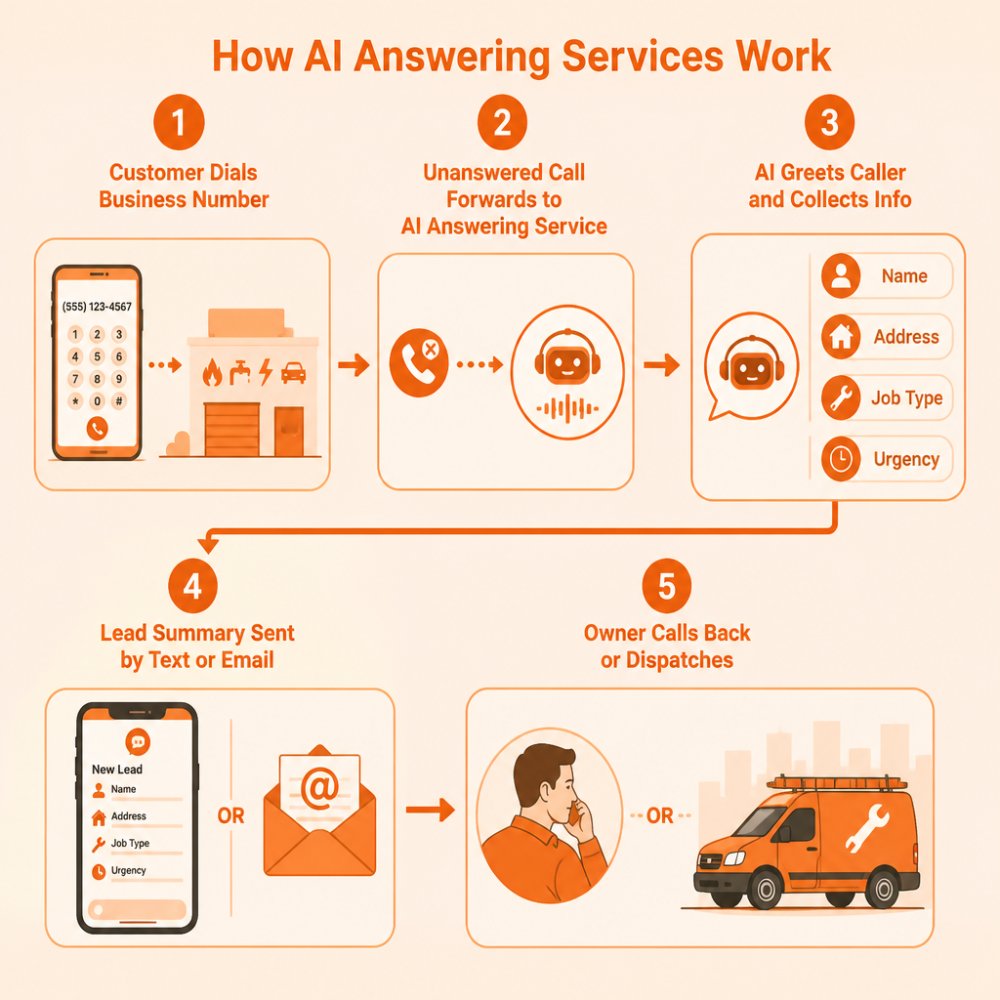
Here's the sequence, step by step:
- A customer dials your existing business number.
- The call goes unanswered, either because you're on another line or past business hours.
- Your phone system forwards the call to the AI answering service.
- The AI greets the caller and explains it's an assistant taking details.
- It collects name, callback number, service address, job type, and urgency.
- The system packages those details into a lead summary.
- You get that summary by text or email, usually within seconds.
- You call the customer back or dispatch a tech.
The key detail: you keep your number. Customers dial what they always have, and the forwarding is set up on your end.
If you want a realistic look at the timeline for getting this running, our guide to AI answering service setup time walks through the checklist from account creation to live test calls.
AI Answering Service Examples for HVAC, Plumbing, Electrical, and Auto Repair
Different trades need different questions. A generic "how can I help you" script wastes everyone's time. Here's how the intake should shift by trade.
HVAC: The AI needs to know whether this is no heat, no cooling, or a maintenance request. It should ask whether the system is running at all, and whether anyone in the home has a medical need for temperature control. That last question changes dispatch priority fast.
Plumbing: Active water where it shouldn't be is the first filter. The AI should ask whether water is currently leaking, whether the main shutoff has been turned off, and whether the issue affects the whole building or one fixture.
Electrical: Safety framing matters. The script should ask about burning smells, sparking, or repeated breaker trips, and whether power is out to the entire property.
Auto repair: Here the questions are about drivability. Is the vehicle safe to drive? Is it at the shop or stranded? What's the year, make, and model?
A common mistake is copying another shop's script wholesale. Your callers use your local vocabulary, and the AI should match it.
AI Answering Service Scripts That Collect the Right Job Details
A good script is short, ordered by urgency, and written the way people actually talk. Here's a template you can adapt for any trade:
Greeting: "Thanks for calling [Business Name]. I'm the virtual assistant. Are you calling about a repair today?"
Urgency filter: "Is this an emergency, or can it wait for a scheduled visit?"
Identity: "Can I get your first and last name?"
Location: "What's the service address, including the ZIP code?"
Callback: "What's the best number to reach you?"
Job detail: "In a sentence or two, what's going on?"
Access: "Is there anything we should know about getting to the equipment, like a gate code or a dog?"
Close: "Got it. The owner will call you back at [number]. Anything else I should pass along?"
Three rules make scripts work. Ask urgency before details, because an emergency caller won't sit through five questions. Keep each question to one idea. And always confirm the callback number by reading it back.
Watch out: scripts that ask for too much up front cause callers to hang up. If your AI opens with an insurance question before finding out what's broken, expect drop-offs.
AI Answering Service vs. Virtual Receptionist: Which Fits Your Shop
An AI answering service handles calls with software. A virtual receptionist is a live person, usually at an off-site call center, answering on your behalf. The tradeoff comes down to cost structure, coverage hours, and how much judgment a call needs.
AI wins on availability and price predictability. It answers at 2 a.m. on a holiday without overtime. It never puts a caller on hold because three lines are busy. Where it struggles is nuance: a caller who's upset, confused, or describing something unusual may need a human.
A live receptionist wins on complex conversations. If your calls routinely involve insurance back-and-forth, multi-step scheduling, or delicate customer situations, a person handles that better. The catch is cost and coverage. Live services typically bill by the minute or the call, and coverage outside business hours often costs more.
Cost and Coverage Comparison
| Factor | AI Answering Service | Virtual Receptionist |
|---|---|---|
| Coverage hours | Around the clock | Usually business hours, extra for nights |
| Pricing model | Subscription with minute allowances | Per minute or per call |
| Handles complex negotiation | Limited | Strong |
| Handles simultaneous calls | Yes | Depends on staffing |
| Setup time | Minutes to a few days | Days to weeks |
| Best for | Missed-call capture, after-hours intake | High-touch, high-volume phone work |
If you're weighing the two directly, our breakdown of missed-call lead capture versus a live receptionist lays out prices, minute caps, and when hiring a person actually makes sense.
Best for AI: shops that lose calls during jobs and after hours. Skip if: nearly every call requires a human to negotiate or de-escalate.
After-Hours Coverage and Missed-Call Lead Capture
After-hours calls are where small service businesses bleed quietly. A furnace fails at 9 p.m. The homeowner calls three shops. Whoever answers first, or calls back first, gets the job. Voicemail rarely wins that race.
AI answering closes the gap without paying someone to sit by a phone overnight. The system picks up, collects the address and the problem, flags it as urgent, and texts you. You decide whether to roll a truck or schedule it for morning.
The same logic applies during the workday. You're elbow-deep in a panel box. The phone rings. Instead of a missed call and a vague voicemail, you get a lead summary with a name, a number, and a specific complaint.
One honest limitation: capturing a lead is not the same as winning it. The AI buys you the information and the response window. You still have to call back fast. A lead summary sitting unread for six hours is only marginally better than voicemail.
Integrations, Call Routing, and Handoff to a Human
Where the lead lands matters as much as how it's captured. Most services offer a few delivery paths: text message, email, or a connection to your CRM. The connection method varies, and this is where marketing pages get fuzzy.
Some integrations are native, meaning the two systems talk directly. Others run through a third-party connector, which passes the lead from one app to another. You can send CallGrabbr leads to Zapier to route new leads into your CRM, Slack, Google Sheets, and other tools. Neither is inherently better, but you should know which you're getting before you buy. If a provider says "integrates with your CRM," ask whether that's built in or routed through a third party.
Privacy, Reliability, and What Happens When the AI Gets It Wrong
Two questions come up in nearly every evaluation: is this private, and what happens when it fails? Here is a practical way to pressure-test any provider before you buy.
Privacy and caller consent
The rules depend on your state and on how the service handles recordings. Some providers record calls; others transcribe without storing audio. Ask directly, and get answers in writing:
- Are calls recorded? If so, is audio stored, or only a transcript?
- How long is data retained? Look for a stated retention period, not a vague "as long as necessary."
- Who can access the data? Ask whether the provider's staff can review calls, and whether you can restrict access.
- Where is data stored, and is it encrypted in transit and at rest?
- Can you export or delete your data if you leave the service?
If you record calls, check your state's consent rules. Recording consent rules vary by state. Federal and state privacy rules may apply to how you handle customer data, so check your state attorney general's office for current consumer-privacy requirements.
A practical safeguard: have the AI disclose up front that it is an assistant taking details for the owner. That single sentence handles the honesty problem and reduces consent friction at the same time.
Reliability and accuracy
Expect imperfection. Speech recognition can stumble on heavy accents, background noise, and unusual addresses. A caller giving a rural route number, a street name that sounds like three others, or a gate code read quickly will sometimes get transcribed wrong. No provider eliminates this; the question is how the system handles it.
The cheapest fix is a confirmation step. Have the AI read back the callback number and the service address before ending the call. It feels slightly repetitive, and it prevents the worst errors.
Watch out: if the AI mishears an address and you dispatch a truck to the wrong town, that is a real cost in fuel, time, and customer trust. Read-back confirmation is the cheapest insurance against it.
Failure handling and fallback routing
Ask what happens when the AI cannot understand a caller, when the caller asks for a human, or when the service itself has an outage. A well-built workflow should:
- Transfer to a human when the caller asks, or when the AI hits a question outside its script.
- Fall back to voicemail or a callback promise if the AI cannot complete intake.
- Route around an outage, ask whether calls fail over to your phone or to a backup number if the service is down.
- Flag low-confidence captures so you know which summaries to double-check before calling back.
Test these paths yourself. Call from a noisy spot, give a deliberately tricky address, ask for a human, and see what happens. A provider that cannot explain its fallback behavior in plain language is telling you something.
Callers who refuse to talk to a machine
Some will hang up. That is why the greeting should say plainly that it is an assistant taking details for the owner, not pretend to be a person. Honesty keeps more callers on the line than a fake human voice does, and it sets the right expectation for the callback.
How to Calculate Whether an AI Answering Service Pays for Itself
Most pricing pages stop at the subscription number. That number tells you what you pay, not whether the tool is worth it. To answer that, you need a model that compares the cost of the service against the value of the leads it recovers, the staff time it saves, and the revenue you would otherwise lose. Here is a transparent way to build one with your own numbers.
Step 1: Estimate the revenue at risk from missed calls
Start with how many calls you actually miss. If you do not track this, estimate conservatively. A common pattern among small service shops is a handful of missed calls per week during busy season, more when a crew is short-staffed.
Use this formula, and label every input as an assumption:
Missed calls per month × assumed conversion rate × average job value = estimated monthly revenue at risk
A hypothetical example, clearly labeled as hypothetical: suppose you miss 20 calls a month, assume one in four of those callers would have become a paying job, and your average job bills a set amount you pull from your own invoices. Multiply 20 by 0.25 to get 5 potential jobs, then multiply by your average job value. That is your estimated monthly revenue at risk, a ceiling, not a promise.
Two cautions. First, not every missed call becomes a job; some callers were price-shopping, some dialed the wrong number, some will call back. Second, revenue is not profit. A job that bills a certain amount may net far less after parts, fuel, and labor. Treat the result as a rough upper bound and run the model with conservative assumptions.
Step 2: Compare against the cost of the alternative
An AI answering service is not competing against zero. It is competing against the cost of the coverage you would otherwise buy: a live answering service, a part-time receptionist, or your own after-hours time.
Live answering services often bill by the minute or by the call, and after-hours coverage can cost more. A part-time receptionist carries wages, payroll taxes, and scheduling overhead, and still only covers the hours you pay for. Your own after-hours time has a cost too, even if it does not show up on an invoice, it is time you are not spending on the jobs that pay the bills.
Put the AI subscription next to whichever alternative you would realistically choose. If the AI captures even a fraction of the leads you would otherwise lose, and costs less than the coverage it replaces, the math usually favors it. If your call volume is very low, or nearly every call needs a human to negotiate, the case is weaker.
Step 3: Add the staff-time savings
Capturing a lead is not just about the call you missed. It is also about the time you or your office staff spend returning voicemails, chasing callbacks, and writing down job details. A lead summary that arrives by text or email with the name, number, address, and complaint already collected saves a step on every call. Estimate how many minutes per call that saves, multiply by your call volume, and put a value on that time using your own labor cost. This is often the smaller number in the model, but it is real.
Step 4: Set a break-even threshold
Once you have your estimated revenue at risk, your alternative coverage cost, and your staff-time savings, you can set a simple break-even test: how many recovered jobs per month does the service need to produce to cover its cost? If that number feels comfortably below what you expect to recover, the tool is worth testing. If it requires nearly every missed call to convert, be skeptical.
To plug real subscription numbers into this model, check CallGrabbr's pricing page for current plan details and trial terms. Run the math with your own figures before you commit, and revisit it after a month of live calls once you have actual capture data.
Start Your CallGrabbr Trial and Test It on Your Own Phone
The only way to know if an AI answering service fits your shop is to call it yourself and listen. CallGrabbr is built for exactly this: you keep your number, unanswered calls forward to us, we collect the caller and job details, and you get a lead summary by text or email. There's no dashboard to learn, and no credit card is required for the trial.
Before you commit, test it like a skeptical customer. Call from a noisy spot. Give a tricky address. Say "it's an emergency" and see what summary comes through. If the details come through clean, you've found your answer.
Frequently Asked Questions
What is an AI answering service for a small business?
It is software that answers phone calls your team cannot pick up, using natural language processing to talk with the caller, collect job details, and send you a summary. For a one-truck HVAC or plumbing shop, it works like a front desk that never steps away from the phone. It captures the lead; it does not replace your judgment about pricing, scheduling, or whether the job is worth taking.
How do AI answering services work with my existing phone number?
Most services, including CallGrabbr, let you keep the number customers already know. You set up conditional forwarding so calls you do not answer ring through to the AI instead of voicemail. The AI greets the caller, asks a short set of questions, and sends the details to you by text or email. Your number stays the same, and you can turn forwarding off at any time.
Can an AI answering service transfer calls to a person?
Check with your provider whether live transfer is available, and test it before you rely on it.
What information can an AI answering service collect from callers?
A well-configured script can collect the caller's name, callback number, service address, the type of job, and how urgent it is. The quality of that intake depends on your scripts and your provider's accuracy, so review real call summaries during your trial before trusting them on live jobs.
Can an AI answering service answer calls after hours?
Yes. After-hours coverage is one of the main reasons small service businesses use one. You choose when calls forward to the AI. The AI takes the details and sends you a summary so you can decide when to call back. Confirm current coverage options on CallGrabbr's pricing page.
Is an AI answering service cheaper than hiring a receptionist?
Usually, yes, but run the math for your own shop. A part-time receptionist carries wages and scheduling overhead. Pricing for CallGrabbr depends on your plan, so check the pricing page for current details. Compare total monthly cost against the value of the jobs you currently lose to voicemail, and treat that as revenue, not profit.
The real test isn't a demo video. It's whether a lead summary lands on your phone while you're still under the sink, with the address and the problem spelled out correctly. Start with the sign-up page to begin your 14-day free trial, forward a few calls, and judge the results yourself. You'll know within a week whether it's earning its keep.
